

We may as well refer to Windows 10 as a date, or an hour, as much as an operating system. It’s a moment in time. A month from now, it will have changed, evolved, improved. But right now? Microsoft has shipped an operating system that was meticulously planned and executed with panache, but whose coat of fresh paint hides some sticks and baling wire.
Windows 10 will keep evolving
Note that this review is not, and will never be, the review of the final version of Windows 10. Microsoft may have frozen its core operating system in advance of the July 29 launch, but the OS and its apps will be updated continually over their lifespan—which, in the case of Windows 10 itself, will be 10 years. We’ve received multiple assurances, however, that what we’re reviewing will be what existing Windows users will begin to receive starting July 29 (remember, the rollout will be in phases), and what will be installed on new PCs from a vendor like Lenovo or Dell. We’ll revisit this review on launch day, just to be sure.
Let’s emphasize this—there is an incredible amount of activity going on right now. Microsoft is busy fixing bugs, hour by hour. Several issues which we noticed in a draft of this review were resolved by the time the final draft was edited. We expect this will continue.
Windows 10 is designed to welcome most Windows users. It will be a free upgrade for users of both Windows 7 and Windows 8/8.1, assuming they switch within a year’s time. Don’t dilly-dally; it’s worth it.
Note that this review is not, and will never be, the review of the final version of Windows 10. Microsoft may have frozen its core operating system in advance of the July 29 launch, but the OS and its apps will be updated continually over their lifespan—which, in the case of Windows 10 itself, will be 10 years. We’ve received multiple assurances, however, that what we’re reviewing will be what existing Windows users will begin to receive starting July 29 (remember, the rollout will be in phases), and what will be installed on new PCs from a vendor like Lenovo or Dell. We’ll revisit this review on launch day, just to be sure.
Let’s emphasize this—there is an incredible amount of activity going on right now. Microsoft is busy fixing bugs, hour by hour. Several issues which we noticed in a draft of this review were resolved by the time the final draft was edited. We expect this will continue.
Windows 10 is designed to welcome most Windows users. It will be a free upgrade for users of both Windows 7 and Windows 8/8.1, assuming they switch within a year’s time. Don’t dilly-dally; it’s worth it.
Which Windows 10? Home vs. Professional
The first two questions you should ask yourself are this: Which version of Windows 10 is available for my computer? And which do I need?
The first question is relatively easy to answer: if you’re upgrading from Windows 7 Home or the basic version of Windows 8, you’ll receive a free upgrade to Windows 10 Home (officially priced at $119). If you own a Surface Pro or a business PC, chances are you’ll upgrade to Windows 10 Professional ($199). I tested both flavors of Windows 10, using a Microsoft Surface Pro 2 with a version of Windows 10 Professional installed on it, as well as an HP Spectre x360 with the consumer version of Windows 10.
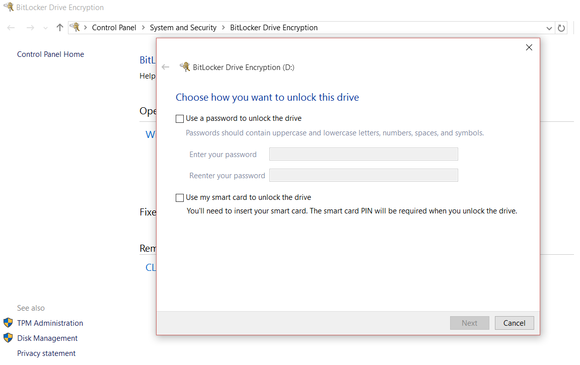
WIndows 10 Professional and Windows 10 Home are very similar, but BitLocker drive encryption is one of the value-added features of Windows 10 Pro.
Microsoft’s professional version of Windows 10 differs from the consumer version in many ways, but three really matter: BitLocker encryption, Remote Access, and the ability to run Hyper-V virtualization on your PC. BitLocker encrypts entire storage volumes with your hard drive and a password, with the option to print or save a recovery key to your OneDrive folder in case you forget it or are eaten by a grue. Remote Access allows you to take control of other PCs—such as those owned by relatives seeking tech support, for example—with the appropriate permissions and passwords. Hyper-V lets you create virtual partitions to test out future builds of Windows 10 (or other software), without the risk of borking your system.

0 comments:
Post a Comment